
Pay down your credit card balance with PC Optimum™ points

- You can now pay down your credit card balance with PC Optimum™ points
- Step-by-step instructions for redeeming your points toward your statement
- It’s one more way you can use your points
We all love earning and redeeming credit card points, right? But what if you could use those points to help you do more with your money.
You can with your PC Financial® credit card in addition to using your PC Optimum™ points in-store at 4,500+ locations, you can now pay down your PC Financial® credit card balance with points!
On the following page you can learn more on how you use your points, why? Because they’re your points!
What does it mean to pay down my balance with points?
In short, this new feature works similar to cashback (once you have at least 10,000 points). You can choose to use the PC Optimum™ points you earn (along with your PC Money™ Account or the PC Optimum™ app) for a credit to help pay down your monthly PC Financial® credit card statement, giving you more financial flexibility and your budget a little extra breathing room.
And the best part? You can use it whenever. No need to wait months or until the next statement until you get your reward — it shows up on your statement within 2–3 days!
Like we said, no cashback! Can you cashback card do that?
No limits, just rewards on your terms
with a PC Financial® credit card

How do you pay down your balance with points?
For every 10,000 PC Optimum™ points you redeem, you can get a $7 statement credit to help you pay down your balance — giving you more flexibility to use your points, your way.
You’ll still need to pay your minimum balance when your redemption is processed. This is the feature as a boost on one of those months where you’re paying down not extra something you hadn’t planned for.
Step-by-step instructions on how to Redeem Points as a Credit Statement
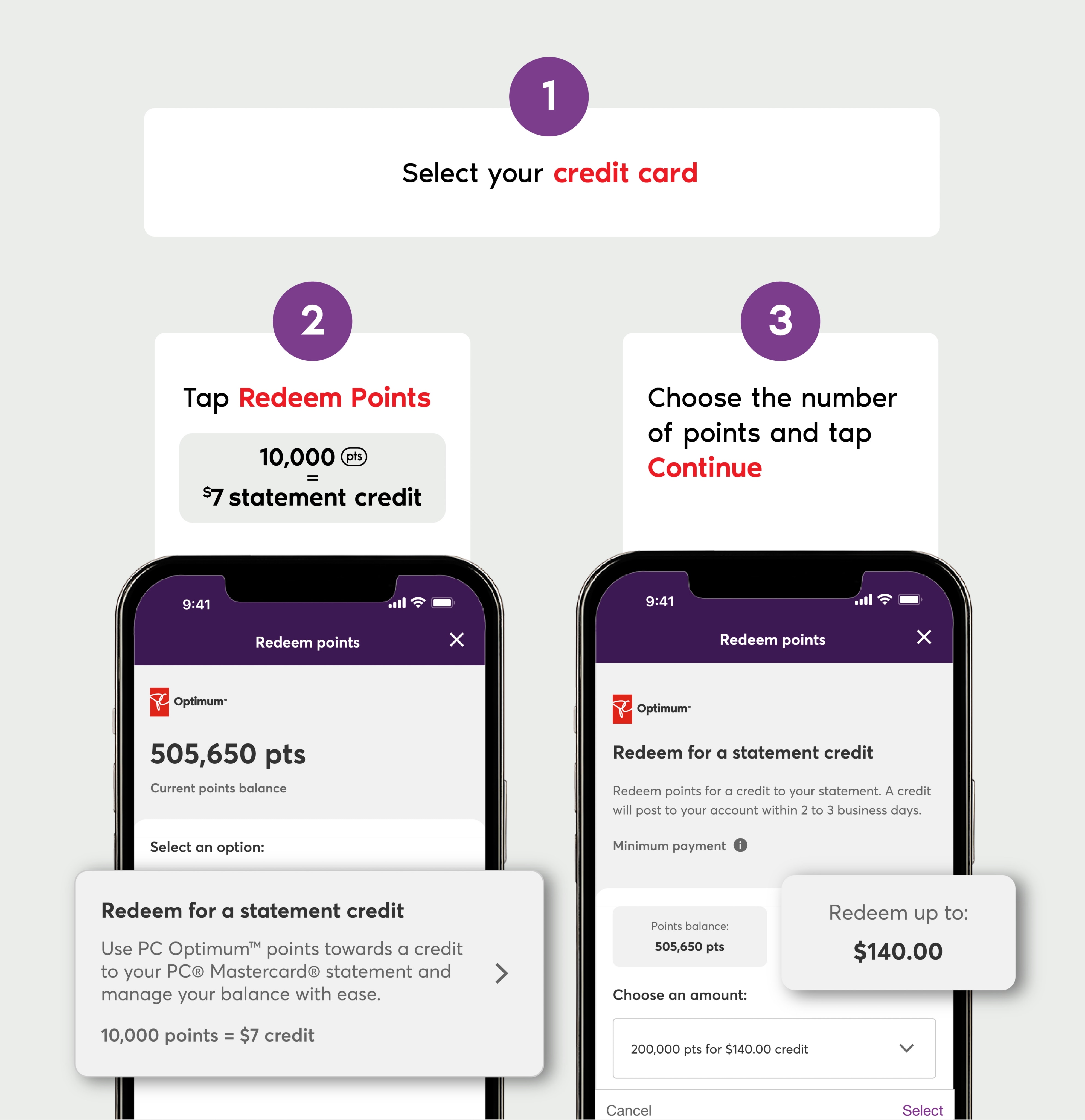
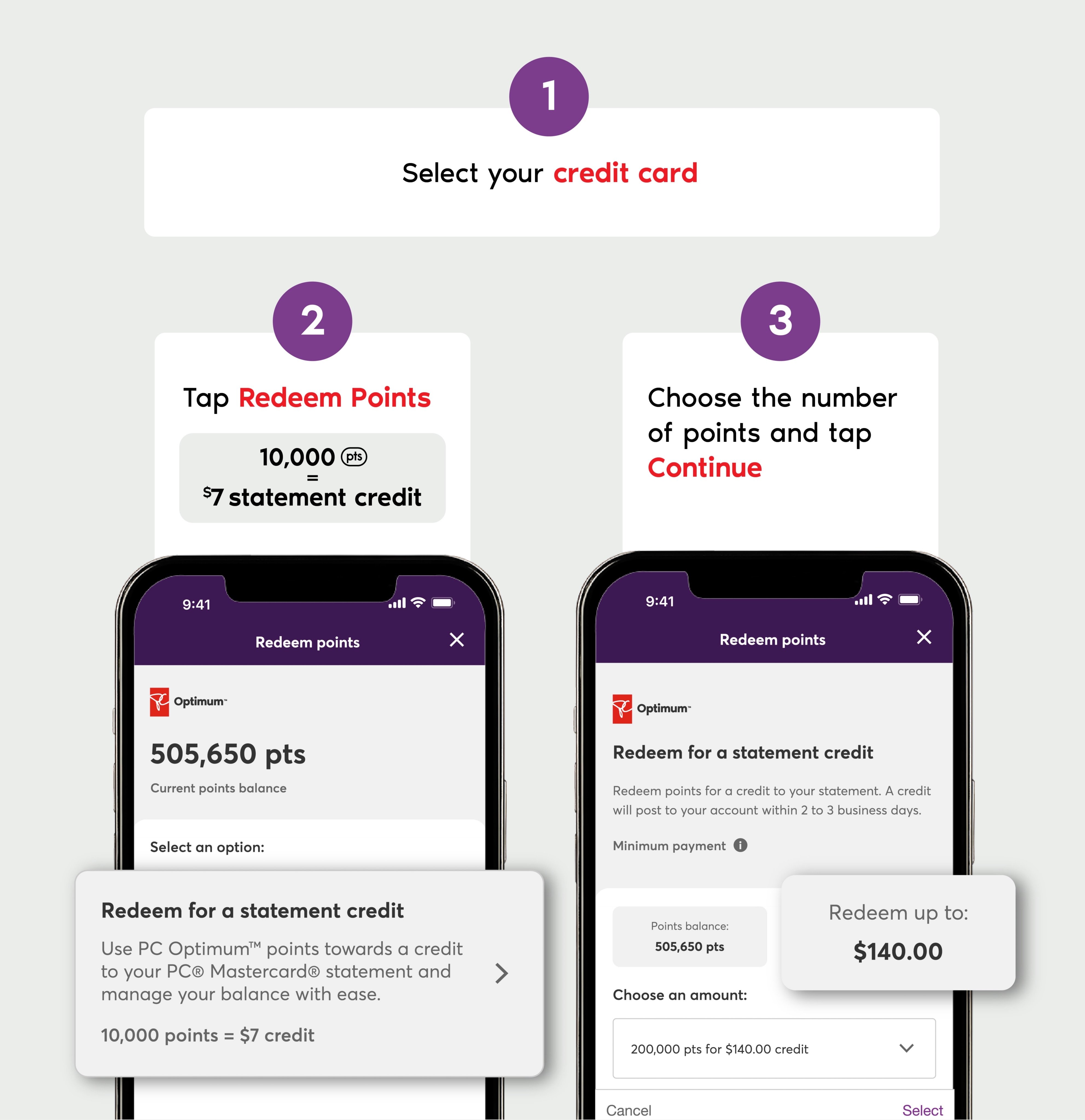
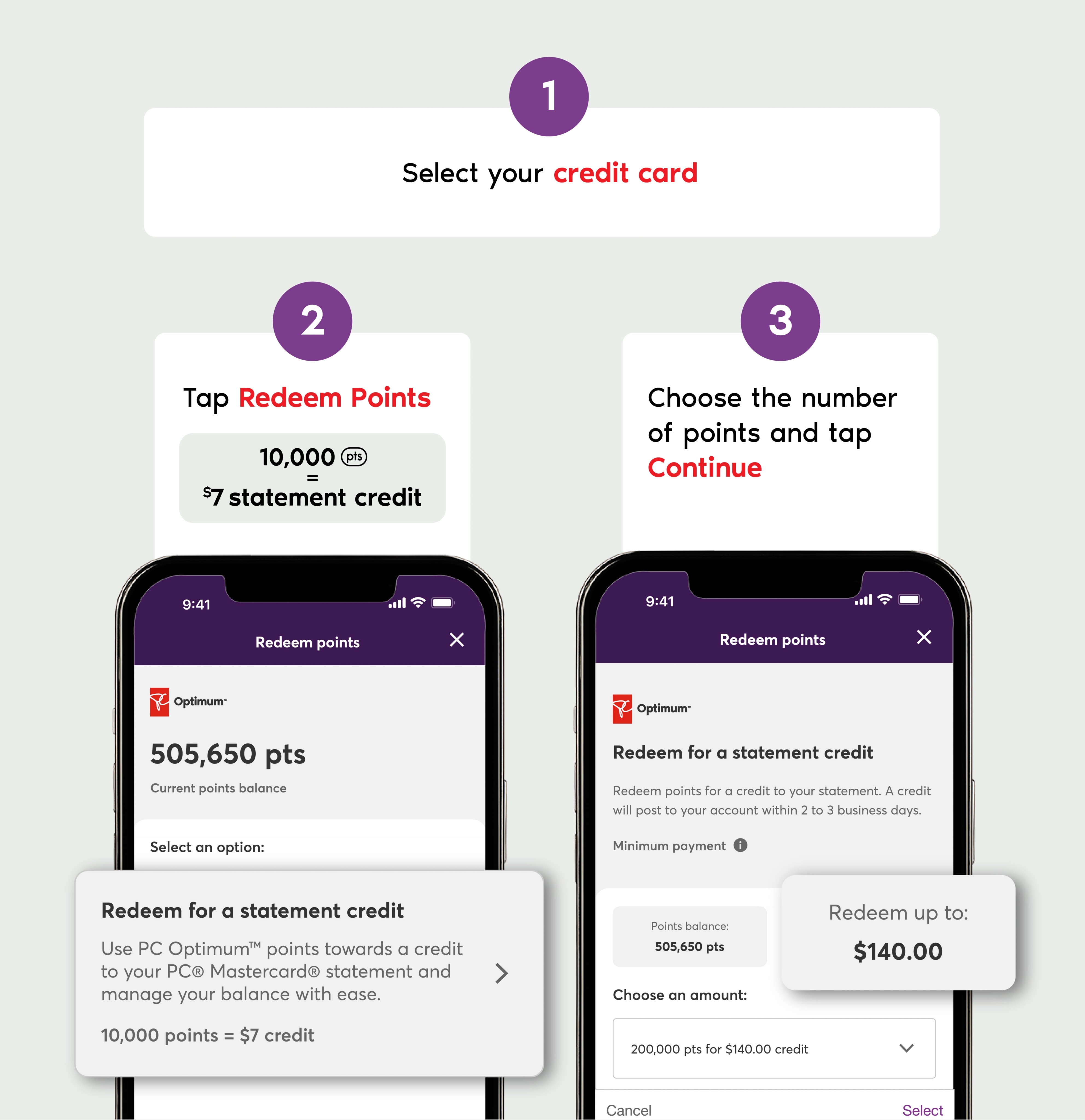
Once you’ve selected the steps above, review your transaction and make it official by pressing the Redeem Points button. Points will be immediately deducted from your account and will be processed on your credit card statement within 2–3 days.
You can use your PC Optimum™ points to add flexibility to how you pay down your balance. Your points, your way.
Good to know:
- You must link your PC Optimum™ account to your credit card to redeem points as a statement credit.
- Redemption may take 2–3 days to appear on your statement after points are deducted.
- Your minimum payment is still required even when you redeem points toward a statement credit.
(General information not about PC Financial® products is provided for your reference and interest only. The above content is intended only to provide a summary and general overview on matters of interest and is not a substitute for and should not be construed as the advice of an experienced professional. PC Financial® does not guarantee the currency, accuracy, applicability, or completeness of this content. 1Statement credit redemptions are available to primary cardholders of an eligible PC® Mastercard® account ("Account") and holders of an eligible PC Optimum™ account, both of which must be open and in good standing at the time of redemption. With this offer, you may redeem PC Optimum™ points using your PC Financial® online account for a statement credit applied against the current balance on your Account. Statement credits are not applied against a specific purchase or other transaction. PC Optimum™ points may be redeemed solely in the increments set out in your PC Financial® online account and for redemption value up to the current balance of your Account, or an amount equal to 500,000 PC Optimum™ points, whichever is lower. The applicable redemption rate will be specified in your PC Financial® online account at the time of redemption. You acknowledge and understand that the PC Optimum™ points redemption rate applicable to this offer may vary from the redemption rate available for other redemption types or offers. For other redemption rates, please refer to your PC Optimum™ Program Terms & Conditions at the URL noted below, or the terms of the specific redemption offer. Once a redemption has been authorized pursuant to this offer, it cannot be changed, cancelled or reversed. Redemption credits from this offer will lower your Account balance, but a redemption is not considered to be a payment on your Account, and you will remain responsible for making a payment of the minimum payment amount specified on your statement by the due date indicated, even if your redemption has reduced your Account balance below your minimum payment amount (including reducing your Account balance to $0.00). Credits may take up to 3 business days to post to the Account. This offer is non-transferable, may not be combined with any other offer, and is subject to change or cancellation without notice to you. This offer and all redemptions pursuant to it are subject to the PC Optimum™ Program Terms & Conditions available online at www.pcoptimum.ca/company-policy/terms-and-conditions. 2Visit pcoptimum.ca for details on participating stores where the PC Optimum™ program is offered. Minimum redemption is 10,000 PC Optimum™ points (worth $10 in free rewards) and in increments of 10,000 PC Optimum™ points thereafter, at participating stores. You can redeem the PC Optimum™ points you earn for eligible purchases, or for any other purposes of which we may advise you from time to time. Some redemption restrictions apply. Visit pcoptimum.ca for details, participating stores and full loyalty terms and conditions. 3Limited to one redemption per day at Esso™ stations. 10 cents off per litre fuel redemption option valid at Esso™ stations across Canada. Car wash redemption option available at participating Esso™ stations with car wash facilities where advertised. Only redeemable at points level specified in a single transaction. 10 cents off per litre valid on actual number of litres fueled, to a maximum of 40 litres per redemption transaction, or a single car wash depending on the redemption option selected. Limit of one redemption per PC Optimum™ account per calendar day at participating Esso™ stations (in accordance with President’s Choice Services Inc.’s official records). A valid PC Optimum™ card, PC Money™ Account card or President’s Choice Financial® Mastercard® must be swiped at the pump or a valid PC Optimum™ card, PC Optimum™ app, PC Money™ Account card or PC Financial® Mastercard® must be scanned or swiped in the station as part of the payment transaction in order for PC Optimum™ points to be redeemed on fuel or car wash purchases, as applicable. Car wash options available for redemption are subject to availability and do not include coin operated car washes. Car wash codes can only be used at the station where the reward was issued unless otherwise specified in writing at the time of redemption and may be subject to expiration timelines. Redemption not available using manual card number entry, phone number entry, or the Speedpass+ app. For fuel redemption, taxes payable on full purchase price before application of reward. Points are not redeemable for cash or credit. We are not obligated to award or redeem points based on errors or misprints. PC Optimum™ redemption is not available at Mobil™ stations.)
Terms and conditions apply. PC Optimum™ points are available for redemption at participating stores and online. Statement credit redemption is only available for eligible accounts and may not be combined with other offers. See program terms for more details.